# Docs cheat sheet

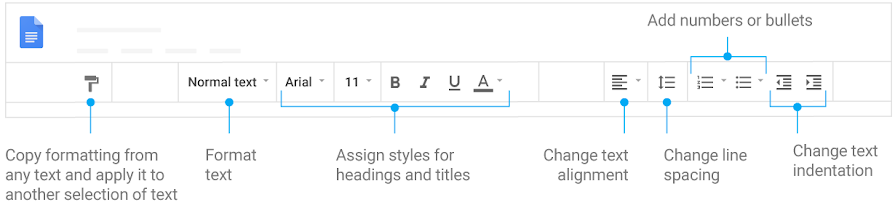
#### 1. Edit and add styles to your text.<span class="subtext"> </span>![" "](https://lh3.googleusercontent.com/Uy1BBioRgZ6-qvgnOK0PvNZRCHsZ5kWcugPzmd4KkTl_jO71vaHA6hkizz_e-kzJlQ=w720 "" "")

![Formatting text options, such as alignment and indentation](https://lh3.googleusercontent.com/cA-OYgFMeKk4rK3xdMYk9D1fAMH_a3Hio8_mhqceugI9u2aEX8uCQYpf3hKgt9UbLLY=w895 "Formatting text options, such as alignment and indentation")

#### 2. Work with different versions and copies of your document.

![" "](https://lh3.googleusercontent.com/Uy1BBioRgZ6-qvgnOK0PvNZRCHsZ5kWcugPzmd4KkTl_jO71vaHA6hkizz_e-kzJlQ=w720 "" "")

**Make a copy:** Create a duplicate of your document.

**Download as:** Download your document in other formats, such as Microsoft<sup>®</sup> Word<sup>®</sup> or Adobe<sup>®</sup> PDF.

**Email as attachment**: Send a copy of the document to people. You can change the format.

**Version history:** See all the changes you and others have made to the document or revert to earlier versions.

**Publish to the web:** Publish a copy of your document as a webpage, or embed your document in a website.

![Click "File" for options to work with different versions](https://lh3.googleusercontent.com/sst76vxQa8-oH41J6s9tzxaAkYrrPDGeVV7ZkOnk--Dp9ylhqzFOabkpUzc9MDwkkY8=w360 "Click "File" for options to work with different versions")

#### 3. Enhance your document by adding features.

![" "](https://lh3.googleusercontent.com/Uy1BBioRgZ6-qvgnOK0PvNZRCHsZ5kWcugPzmd4KkTl_jO71vaHA6hkizz_e-kzJlQ=w720 "" "")

**Image:** Insert an image from your computer, the web, Drive, and more.

**Table:** Select the number of columns and rows to create a table.

**Drawing:** Create pictures, flowcharts, diagrams, and more.

**Link:** Add a link to a webpage or a header or bookmark in your document.

**Chart**: Add different types of charts, or add a chart from Sheets.

**Bookmark:** Add shortcuts to specific places within your document.

**Table of contents:** Create an autogenerated table of contents that links to each heading (where you’ve applied heading styles).

![Insert items using the menu](https://lh3.googleusercontent.com/cDObcUYBqZh5srP70Z5Y_2Fyz7yNpsTYprVzufgRlCjIRMKwc_k_yV55M-9z9JGLFzQ=w360 "Insert items using the menu")

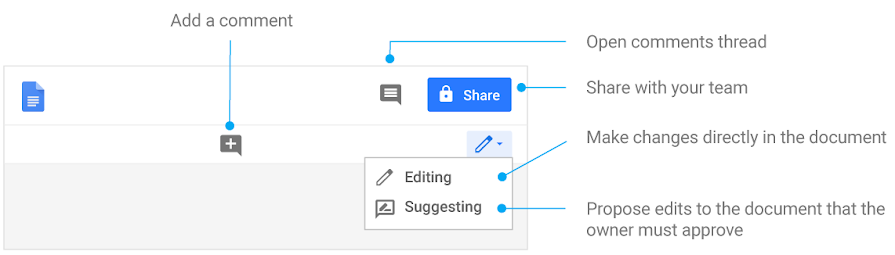
#### 4. Click Share to share your document and then choose what collaborators can do. They’ll also receive an email notification.

![" "](https://lh3.googleusercontent.com/Uy1BBioRgZ6-qvgnOK0PvNZRCHsZ5kWcugPzmd4KkTl_jO71vaHA6hkizz_e-kzJlQ=w720 "" "")

<table class="nice-table wide spaced-table" id="bkmrk-%C2%A0-share-or-unshare-e"><thead><tr><th> </th><th>Share or unshare</th><th>Edit content directly</th><th>Suggest edits</th><th>Add comments</th></tr></thead><tbody><tr><td>**Can edit**</td><td class="align-center">**✔**</td><td class="align-center">**✔**</td><td class="align-center">**✔**</td><td class="align-center">**✔**</td></tr><tr><td>**Can comment**</td><td class="align-center"> </td><td class="align-center"> </td><td class="align-center">**✔**</td><td class="align-center">**✔**</td></tr><tr><td>**Can view**</td><td class="align-center"> </td><td class="align-center"> </td><td class="align-center"> </td><td class="align-center"> </td></tr></tbody></table>

#### 5. Collaborate with your team in real time.![" "](https://lh3.googleusercontent.com/Uy1BBioRgZ6-qvgnOK0PvNZRCHsZ5kWcugPzmd4KkTl_jO71vaHA6hkizz_e-kzJlQ=w720 "" "")

![Find collaboration features](https://lh3.googleusercontent.com/nm92yuBR2K145O4D9bYoQpz5ICmjytw37GE8eQoIfgBL2AmjYFTXiKj49bAelGb7ltCm=w895 "Find collaboration features")