# How to Connect iPhone to ISS Network

If you are looking for how to disconnect from the network, please follow these instructions linked here - <span style="color: rgb(35, 111, 161);">[Remove ISS Network](https://iss-kb.iss.k12.nc.us/books/adding-cell-phones-to-the-network-apple-and-android/page/how-to-remove-iss-network-certificate-from-iphone)[ Connection](https://iss-kb.iss.k12.nc.us/books/adding-cell-phones-to-the-network-apple-and-android/page/how-to-remove-iss-network-certificate-from-iphone)</span>

<table border="1" class="align-center" id="bkmrk-%C2%A0scan-the-qr-code-be" style="border-collapse: collapse; width: 100%; height: 2645.19px; border-width: 0px;"><colgroup><col style="width: 33.3333%;"></col><col style="width: 33.3333%;"></col><col style="width: 33.3333%;"></col></colgroup><tbody><tr style="height: 111.5px;"><td style="height: 111.5px; border-width: 0px;">1. Scan the QR Code below

</td><td class="align-center" style="height: 111.5px; border-width: 0px;">### OR 

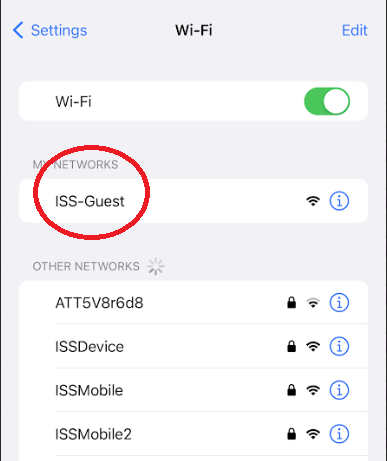
</td><td style="height: 111.5px; border-width: 0px;">1. Connect to the network **ISS-Guest**

</td></tr><tr style="height: 320.984px;"><td style="height: 320.984px; border-width: 0px;">[![image.png](https://iss-kb.iss.k12.nc.us/uploads/images/gallery/2023-06/scaled-1680-/n7Pimage.png)](https://iss-kb.iss.k12.nc.us/uploads/images/gallery/2023-06/n7Pimage.png)

</td><td style="height: 320.984px; border-width: 0px;">  
</td><td style="height: 320.984px; border-width: 0px;">[![image.png](https://iss-kb.iss.k12.nc.us/uploads/images/gallery/2023-06/scaled-1680-/image.png)](https://iss-kb.iss.k12.nc.us/uploads/images/gallery/2023-06/image.png)  
</td></tr><tr style="height: 56.7969px;"><td style="border-width: 0px; height: 56.7969px;">  
</td><td style="border-width: 0px; height: 56.7969px;">  
</td></tr><tr style="height: 54.7969px;"><td style="border-width: 0px; height: 54.7969px;">  
</td><td style="border-width: 0px; height: 54.7969px;">  
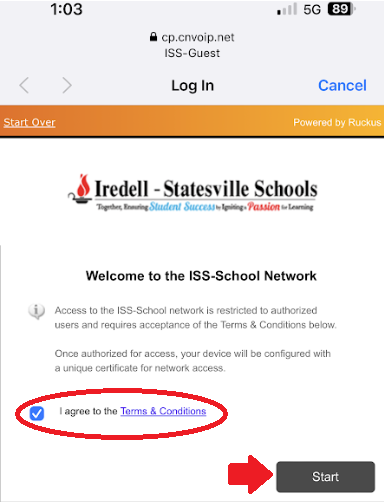
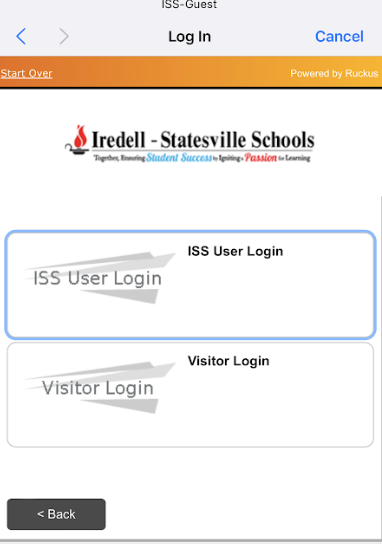
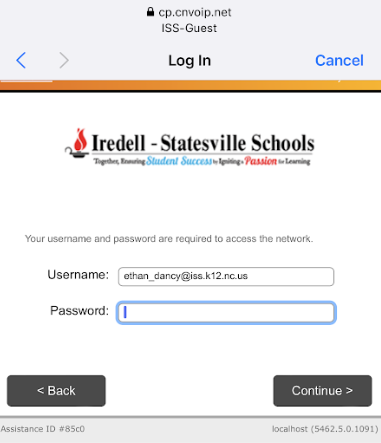
</td></tr><tr style="height: 63.375px;"><td style="height: 63.375px; border-width: 0px;">2. Read &amp; Agree to our Terms &amp; Conditions and check the box that you agree and then click **Start.**</td><td style="height: 63.375px; border-width: 0px;">3. If you are a Staff Member, click **ISS User Login** </td><td style="height: 63.375px; border-width: 0px;">4. On the next Page, put your full email address and Password in and click **Continue** </td></tr><tr style="height: 380.078px;"><td style="height: 380.078px; border-width: 0px;">[![image.png](https://iss-kb.iss.k12.nc.us/uploads/images/gallery/2023-06/scaled-1680-/qpRimage.png)](https://iss-kb.iss.k12.nc.us/uploads/images/gallery/2023-06/qpRimage.png)

</td><td style="height: 380.078px; border-width: 0px;">[![image.png](https://iss-kb.iss.k12.nc.us/uploads/images/gallery/2023-06/scaled-1680-/h1himage.png)](https://iss-kb.iss.k12.nc.us/uploads/images/gallery/2023-06/h1himage.png)

</td><td style="height: 380.078px; border-width: 0px;">[![image.png](https://iss-kb.iss.k12.nc.us/uploads/images/gallery/2023-06/scaled-1680-/f3Timage.png)](https://iss-kb.iss.k12.nc.us/uploads/images/gallery/2023-06/f3Timage.png)

</td></tr><tr style="height: 81.375px;"><td style="border-width: 0px; height: 81.375px;"><span style="font-family: -apple-system, BlinkMacSystemFont, 'Segoe UI', Oxygen, Ubuntu, Roboto, Cantarell, 'Fira Sans', 'Droid Sans', 'Helvetica Neue', sans-serif; font-size: 14px; font-style: normal; font-variant-ligatures: normal; font-variant-caps: normal; font-weight: 400;">  
</span>

</td><td style="border-width: 0px; height: 81.375px;"><span style="font-family: -apple-system, BlinkMacSystemFont, 'Segoe UI', Oxygen, Ubuntu, Roboto, Cantarell, 'Fira Sans', 'Droid Sans', 'Helvetica Neue', sans-serif; font-size: 14px; font-style: normal; font-variant-ligatures: normal; font-variant-caps: normal; font-weight: 400;">  
</span>

</td><td style="border-width: 0px; height: 81.375px;"><span style="font-family: -apple-system, BlinkMacSystemFont, 'Segoe UI', Oxygen, Ubuntu, Roboto, Cantarell, 'Fira Sans', 'Droid Sans', 'Helvetica Neue', sans-serif; font-size: 14px; font-style: normal; font-variant-ligatures: normal; font-variant-caps: normal; font-weight: 400;">  
</span>

</td></tr><tr style="height: 54.375px;"><td style="border-width: 0px; height: 54.375px;"><span style="font-family: -apple-system, BlinkMacSystemFont, 'Segoe UI', Oxygen, Ubuntu, Roboto, Cantarell, 'Fira Sans', 'Droid Sans', 'Helvetica Neue', sans-serif; font-size: 14px; font-style: normal; font-variant-ligatures: normal; font-variant-caps: normal; font-weight: 400;">  
</span>

</td><td style="border-width: 0px; height: 54.375px;"><span style="font-family: -apple-system, BlinkMacSystemFont, 'Segoe UI', Oxygen, Ubuntu, Roboto, Cantarell, 'Fira Sans', 'Droid Sans', 'Helvetica Neue', sans-serif; font-size: 14px; font-style: normal; font-variant-ligatures: normal; font-variant-caps: normal; font-weight: 400;">  
</span>

</td><td style="border-width: 0px; height: 54.375px;"><span style="font-family: -apple-system, BlinkMacSystemFont, 'Segoe UI', Oxygen, Ubuntu, Roboto, Cantarell, 'Fira Sans', 'Droid Sans', 'Helvetica Neue', sans-serif; font-size: 14px; font-style: normal; font-variant-ligatures: normal; font-variant-caps: normal; font-weight: 400;">  
</span>

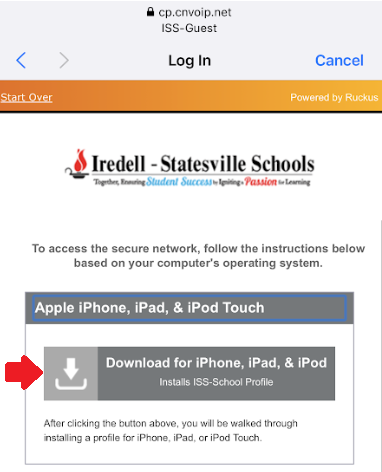
</td></tr><tr style="height: 102.547px;"><td style="height: 102.547px; border-width: 0px;"><span style="font-family: -apple-system, BlinkMacSystemFont, 'Segoe UI', Oxygen, Ubuntu, Roboto, Cantarell, 'Fira Sans', 'Droid Sans', 'Helvetica Neue', sans-serif; font-size: 14px; font-style: normal; font-variant-ligatures: normal; font-variant-caps: normal; font-weight: 400;">5. Download the certificate </span>

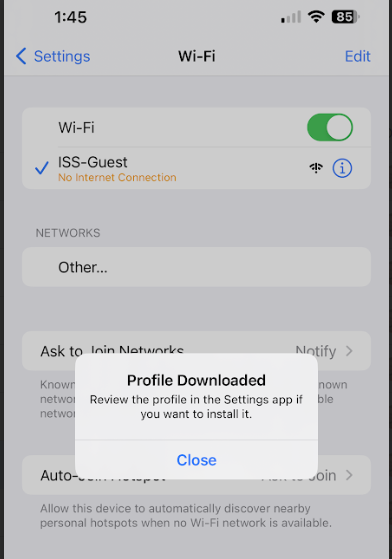
</td><td style="height: 102.547px; border-width: 0px;"><span style="font-family: -apple-system, BlinkMacSystemFont, 'Segoe UI', Oxygen, Ubuntu, Roboto, Cantarell, 'Fira Sans', 'Droid Sans', 'Helvetica Neue', sans-serif; font-size: 14px; font-style: normal; font-variant-ligatures: normal; font-variant-caps: normal; font-weight: 400;">6. It will then prompt you that the profile is downloaded. You can click on Close on the profile, and then go back to the Settings App on your phone. </span>

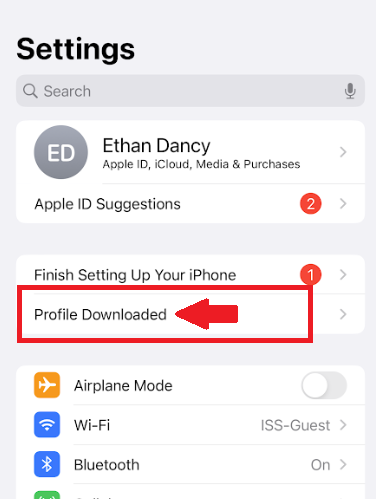
</td><td style="height: 102.547px; border-width: 0px;"><span style="font-family: -apple-system, BlinkMacSystemFont, 'Segoe UI', Oxygen, Ubuntu, Roboto, Cantarell, 'Fira Sans', 'Droid Sans', 'Helvetica Neue', sans-serif; font-size: 14px; font-style: normal; font-variant-ligatures: normal; font-variant-caps: normal; font-weight: 400;">7. Up near the top of </span>**Settings**<span style="font-family: -apple-system, BlinkMacSystemFont, 'Segoe UI', Oxygen, Ubuntu, Roboto, Cantarell, 'Fira Sans', 'Droid Sans', 'Helvetica Neue', sans-serif; font-size: 14px; font-style: normal; font-variant-ligatures: normal; font-variant-caps: normal; font-weight: 400;">, you will see a button that says </span>**Profile Downloaded** <span style="font-family: -apple-system, BlinkMacSystemFont, 'Segoe UI', Oxygen, Ubuntu, Roboto, Cantarell, 'Fira Sans', 'Droid Sans', 'Helvetica Neue', sans-serif; font-size: 14px; font-style: normal; font-variant-ligatures: normal; font-variant-caps: normal; font-weight: 400;">- click on this </span>

</td></tr><tr style="height: 402.953px;"><td style="height: 402.953px; border-width: 0px;">[![image.png](https://iss-kb.iss.k12.nc.us/uploads/images/gallery/2023-06/scaled-1680-/eYhimage.png)](https://iss-kb.iss.k12.nc.us/uploads/images/gallery/2023-06/eYhimage.png)

</td><td style="height: 402.953px; border-width: 0px;">[![image.png](https://iss-kb.iss.k12.nc.us/uploads/images/gallery/2023-06/scaled-1680-/doDimage.png)](https://iss-kb.iss.k12.nc.us/uploads/images/gallery/2023-06/doDimage.png)

</td><td style="height: 402.953px; border-width: 0px;">[![image.png](https://iss-kb.iss.k12.nc.us/uploads/images/gallery/2023-06/scaled-1680-/GaSimage.png)](https://iss-kb.iss.k12.nc.us/uploads/images/gallery/2023-06/GaSimage.png)

</td></tr><tr style="height: 60.375px;"><td style="border-width: 0px; height: 60.375px;"></td><td style="border-width: 0px; height: 60.375px;"><span style="font-family: -apple-system, BlinkMacSystemFont, 'Segoe UI', Oxygen, Ubuntu, Roboto, Cantarell, 'Fira Sans', 'Droid Sans', 'Helvetica Neue', sans-serif; font-size: 14px; font-style: normal; font-variant-ligatures: normal; font-variant-caps: normal; font-weight: 400;">  
</span>

</td><td style="border-width: 0px; height: 60.375px;"><span style="font-family: -apple-system, BlinkMacSystemFont, 'Segoe UI', Oxygen, Ubuntu, Roboto, Cantarell, 'Fira Sans', 'Droid Sans', 'Helvetica Neue', sans-serif; font-size: 14px; font-style: normal; font-variant-ligatures: normal; font-variant-caps: normal; font-weight: 400;">  
</span>

</td></tr><tr style="height: 45.375px;"><td style="border-width: 0px; height: 45.375px;"></td><td style="border-width: 0px; height: 45.375px;"><span style="font-family: -apple-system, BlinkMacSystemFont, 'Segoe UI', Oxygen, Ubuntu, Roboto, Cantarell, 'Fira Sans', 'Droid Sans', 'Helvetica Neue', sans-serif; font-size: 14px; font-style: normal; font-variant-ligatures: normal; font-variant-caps: normal; font-weight: 400;">  
</span>

</td><td style="border-width: 0px; height: 45.375px;"><span style="font-family: -apple-system, BlinkMacSystemFont, 'Segoe UI', Oxygen, Ubuntu, Roboto, Cantarell, 'Fira Sans', 'Droid Sans', 'Helvetica Neue', sans-serif; font-size: 14px; font-style: normal; font-variant-ligatures: normal; font-variant-caps: normal; font-weight: 400;">  
</span>

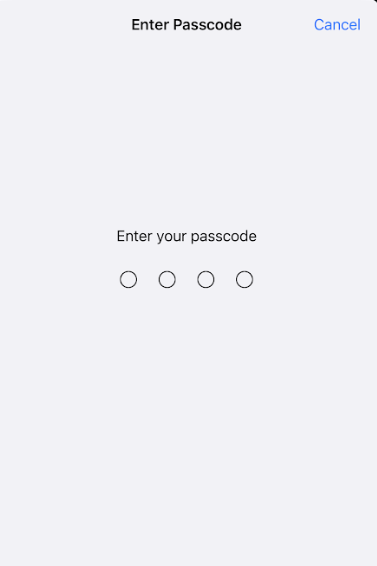
</td></tr><tr style="height: 80.1719px;"><td style="height: 80.1719px; border-width: 0px;">8\. It will then ask you for your phone passcode.

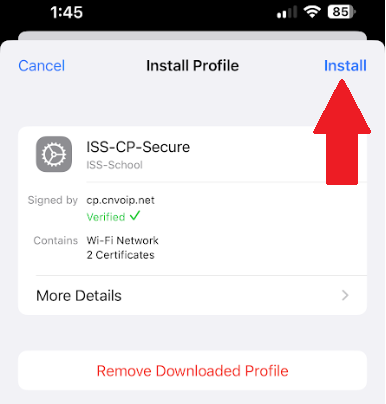
</td><td style="height: 80.1719px; border-width: 0px;"><span style="font-family: -apple-system, BlinkMacSystemFont, 'Segoe UI', Oxygen, Ubuntu, Roboto, Cantarell, 'Fira Sans', 'Droid Sans', 'Helvetica Neue', sans-serif; font-size: 14px; font-style: normal; font-variant-ligatures: normal; font-variant-caps: normal; font-weight: 400;">9. It will then ask you to Install the Certificate. Click </span>**Install** <span style="font-family: -apple-system, BlinkMacSystemFont, 'Segoe UI', Oxygen, Ubuntu, Roboto, Cantarell, 'Fira Sans', 'Droid Sans', 'Helvetica Neue', sans-serif; font-size: 14px; font-style: normal; font-variant-ligatures: normal; font-variant-caps: normal; font-weight: 400;">in the top right</span>

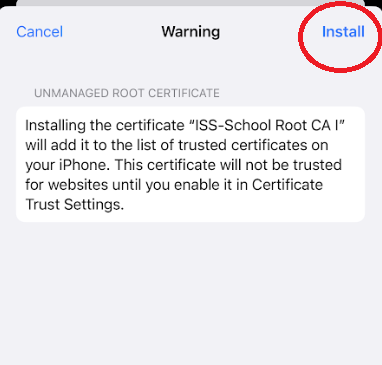
</td><td style="height: 80.1719px; border-width: 0px;"><span style="font-family: -apple-system, BlinkMacSystemFont, 'Segoe UI', Oxygen, Ubuntu, Roboto, Cantarell, 'Fira Sans', 'Droid Sans', 'Helvetica Neue', sans-serif; font-size: 14px; font-style: normal; font-variant-ligatures: normal; font-variant-caps: normal; font-weight: 400;">10. If you receive a warning click </span>**Install** <span style="font-family: -apple-system, BlinkMacSystemFont, 'Segoe UI', Oxygen, Ubuntu, Roboto, Cantarell, 'Fira Sans', 'Droid Sans', 'Helvetica Neue', sans-serif; font-size: 14px; font-style: normal; font-variant-ligatures: normal; font-variant-caps: normal; font-weight: 400;">again in the top right. </span>

</td></tr><tr style="height: 398.688px;"><td style="height: 398.688px; border-width: 0px;">[![image.png](https://iss-kb.iss.k12.nc.us/uploads/images/gallery/2023-06/scaled-1680-/smUimage.png)](https://iss-kb.iss.k12.nc.us/uploads/images/gallery/2023-06/smUimage.png)

</td><td style="height: 398.688px; border-width: 0px;">[![z3Yimage.png](https://iss-kb.iss.k12.nc.us/uploads/images/gallery/2023-06/scaled-1680-/z3yimage.png)](https://iss-kb.iss.k12.nc.us/uploads/images/gallery/2023-06/z3yimage.png)

</td><td style="height: 398.688px; border-width: 0px;">[![image.png](https://iss-kb.iss.k12.nc.us/uploads/images/gallery/2023-06/scaled-1680-/vNaimage.png)](https://iss-kb.iss.k12.nc.us/uploads/images/gallery/2023-06/vNaimage.png)

</td></tr><tr style="height: 156.938px;"><td style="height: 156.938px; border-width: 0px;">  
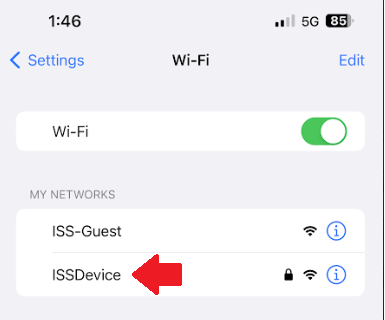
</td><td style="height: 156.938px; border-width: 0px;">After all of these steps are completed you should now be able to go back to your WiFi Settings, and then connect to **ISSDevice** automatically.

</td><td style="height: 156.938px; border-width: 0px;">  
</td></tr><tr style="height: 229.484px;"><td style="height: 229.484px; border-width: 0px;">  
</td><td style="height: 229.484px; border-width: 0px;">[![image.png](https://iss-kb.iss.k12.nc.us/uploads/images/gallery/2023-06/scaled-1680-/POqimage.png)](https://iss-kb.iss.k12.nc.us/uploads/images/gallery/2023-06/POqimage.png)

</td><td style="height: 229.484px; border-width: 0px;">  
</td></tr></tbody></table>